Connect MindThread to Claude: pull your best posts first, then draft
Table of Contents
On November 4, Dan Koe published a long X article, "The most lucrative AI business to start in 2027". One part describes connecting a tool to Claude or ChatGPT over MCP and using a prompt that starts:
"Pull the best content from [@handles]. 10-20 posts from each platform they are on."
The prompt then asks the AI to write down the core ideas that make the person unique, the parts of their voice with personality, and a guess at their worldview, and compile it into a document.
This works on Threads. We ran it end to end on our own account, @ultralab.tw: MindThread picked the 20 best-performing posts out of 339 posts with fetched metrics, Claude wrote a content document from them, then drafted 3 new posts from that document. Below is how to set it up, both prompts, the output of every step, and the mistakes we hit. The images re-lay out the data the test run returned; the content is verbatim, but they are not raw screenshots.
One limit first
Dan Koe's prompt studies other people's accounts. Threads does not allow that: the official API only returns insights for the authorized user's own posts, so MindThread's get_top_posts only reads accounts you connected. This post is about studying yourself. The posts people actually responded to are the ones worth building on.
What you need
- A MindThread account with your Threads account connected
- Claude Code (Claude Desktop and other MCP-capable apps work too; we tested Claude Code)
- A MindThread live key (starts with mt_live_)
get_top_posts was added in MindThread API 1.22.0. Once connected, if it shows up in the tool list, you can use it; if it does not, the MindThread you connected to has not been updated to 1.22.0 yet.
Step 1: create a read-only key
On mindthread.tw, go to Settings → API keys and create a live key. The key is shown only once, so save it.
New keys start on the "Standard" preset, where scheduled posts do not ask first. This flow only reads, so after creating the key, click "Edit permissions and name", open "Advanced: set each permission", set "Read data" to Allow and the other nine permissions to "Don't allow". Even if Claude misunderstands you, it cannot send anything.
Do not use a test key (starts with mt_test_) for this. With a test key, get_top_posts returns three placeholder posts marked as sandbox demos, and the response says data_source: mock. A style document built from fake posts is worthless.
Step 2: connect Claude Code
Run one line in your terminal:
claude mcp add --transport http mindthread https://mindthread.tw/api/mcp --header "Authorization: Bearer mt_live_your_key"
If you would rather not store the key in the config, drop the --header part and run /mcp inside Claude Code to sign in with your MindThread account.
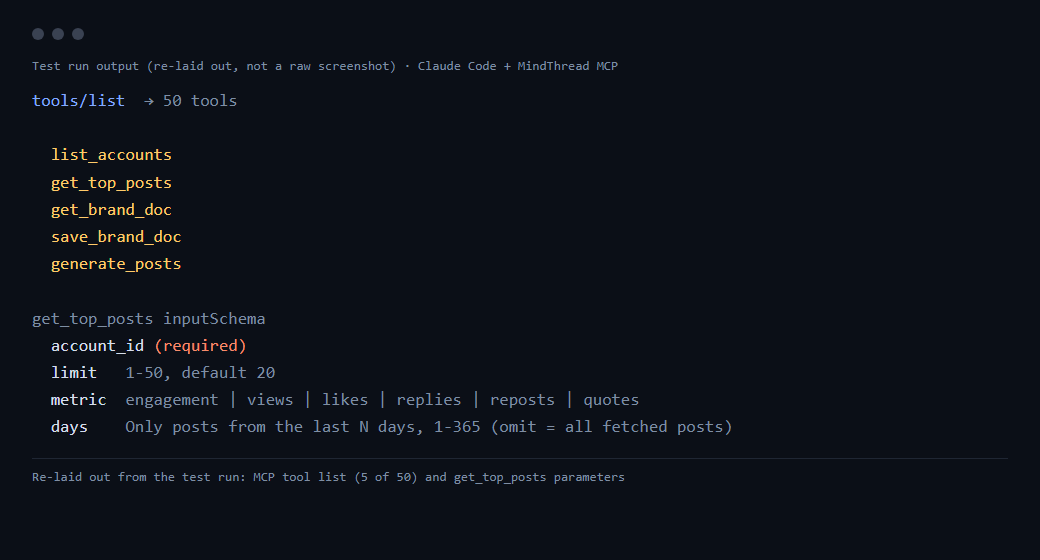
Then try "list my MindThread accounts". Claude calls list_accounts. get_top_posts should be in the tool list. It takes four parameters: account_id (required), limit from 1 to 50 (default 20), metric (engagement, views, likes, replies, reposts or quotes), and days, which limits it to the last N days (1 to 365; leave it out for every fetched post).
Step 3: pull the top 20 and build a content document
We ran this prompt in Chinese with @ultralab.tw as the account. This is a direct translation:
Use MindThread to make me a "content document":
1. Use list_accounts to list my accounts. The one I want is @your_account.
2. Use get_top_posts to fetch this account's 20 best posts by engagement (metric engagement, limit 20).
3. Read all 20 and write a document with four sections:
- Core ideas: 3 to 5 claims that keep coming back and get strong engagement, each with 1 original post as an example
- Voice: sentence length, how posts open, common words, person, and which styles get especially good engagement
- Worldview: why readers identify with this account and follow it
- Data scope: how many posts, the posting period, and which day MindThread fetched the metrics
4. Do not invent numbers or experiences that are not in the posts. Do not save anything yet; just show me.
Engagement is likes, replies, reposts and quotes added together. Each post comes back with its text, publish time, those four counts plus views, an engagement rate, and metrics_fetched_at (when MindThread last read that post's metrics).
Change the metric and you see a different account. engagement shows what resonated; views shows which posts traveled furthest; replies shows which topics made people speak up. To look only at recent posts, add days: 90. We ran engagement only, because a content document is about what readers identify with, not what the algorithm pushed.
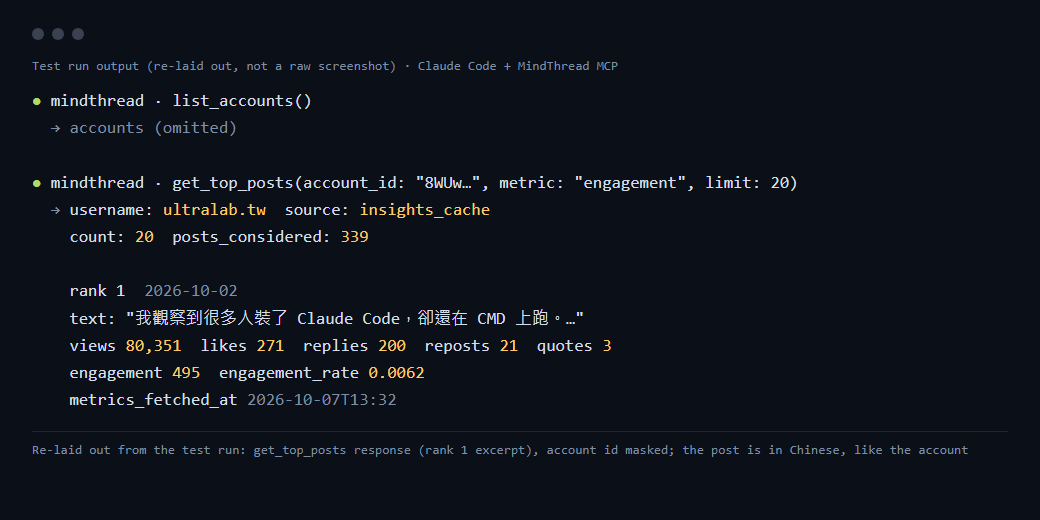
Our top post, from October 2, opened with "I've noticed a lot of people install Claude Code and still run it in CMD." It had 80,351 views and 200 replies (as read on October 7). It was a condensed version of our three-layer Claude Code upgrade guide.
Claude found four core ideas: the gap in how people use tools is a management problem, simple and stable beats complex and polished, AI is a tool but people make the calls, and our own production line is the test bench. The voice section caught things we had not noticed ourselves: one sentence per line, the "not X, but Y" pattern at least 6 times in 20 posts, question endings drawing more replies, and one-line maxim endings drawing likes but few replies. We recounted from the returned data: "not X, but Y" actually appears in 8 posts, and the question-ending posts do get clearly more replies; the maxim-ending point rests mostly on the number 3 post alone. 20 posts is a small sample, so treat it as a hint.
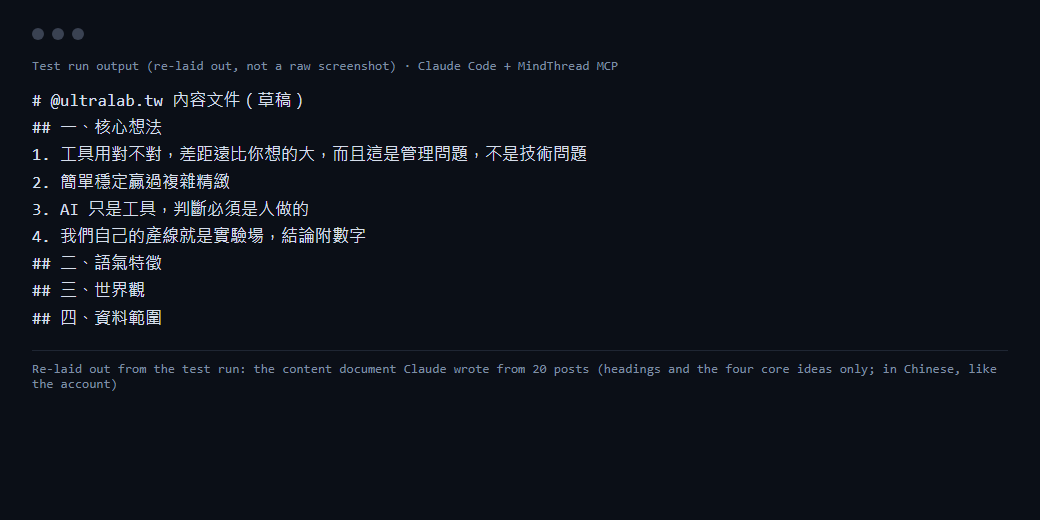
The most useful part was an exception it flagged on its own. The number 2 post was a current-affairs post unrelated to the account's topics, with a lot of replies. Claude said it should not count as a core idea or steer planning. Without that note, one off-topic post would have skewed the whole document.
Step 4: draft 3 posts from the document
In the same conversation (again translated from the Chinese we ran):
Based on the content document above, draft 3 new Threads posts:
- Each one uses a different core idea and follows the voice in the document
- Each under 500 characters, with a first line that makes people stop
- Do not reuse sentences from old posts, and do not invent numbers or experiences; mark any place that needs a number with [TBD]
- After each post, add one line saying which part of the document you used
Just show me. Do not post, schedule or save.
Each draft uses one core idea. Draft 1 needed a multiplier; Claude did not make one up and left a placeholder for us to fill in. At the end it flagged two things: draft 1 needs a real number or the line should go, and draft 3 is written as advice, so if we really work that way, first person would land harder. Both are right, and they are exactly where AI slips most easily: numbers and experiences.
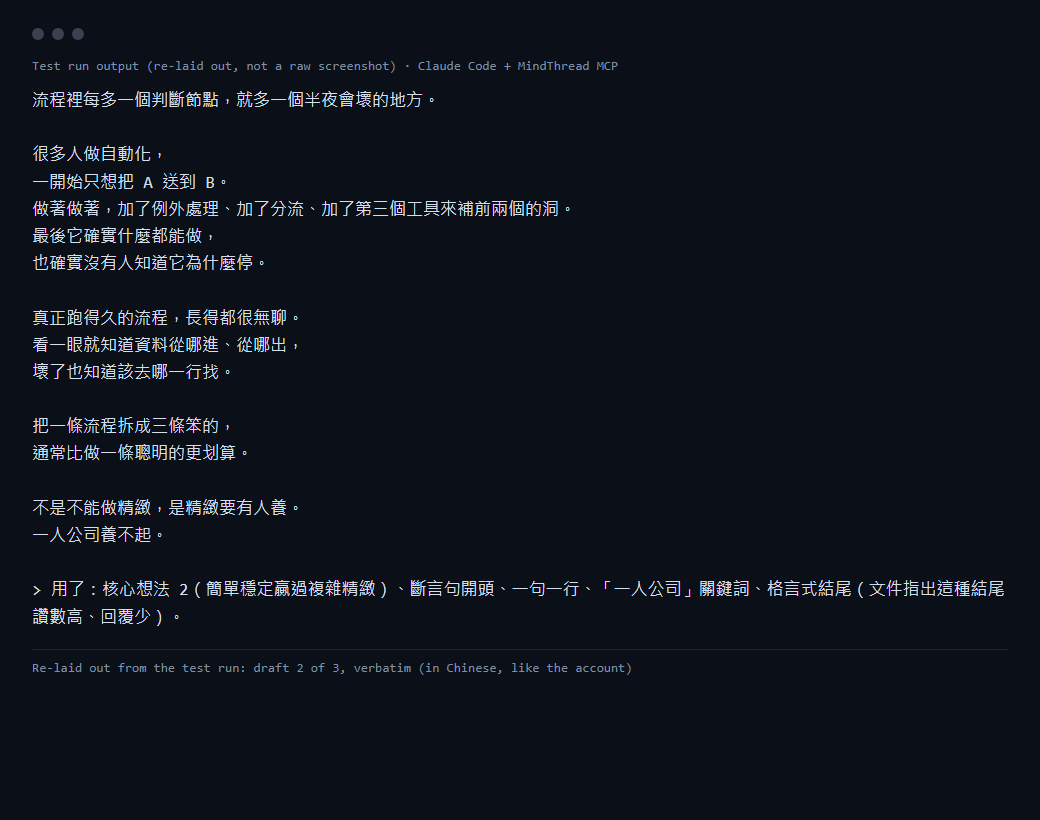
We did not post any of them as is. Dan Koe says it in the same article:
"The reason we interview them and pull in their best content isn't to automate the entire process."
Pulling posts and writing the document is there so drafting does not start from zero, not so the AI posts for you. A draft becomes yours once you have edited it and checked the numbers.
Saving the document
Once the document looks right, you can ask Claude to store it in MindThread with save_brand_doc (doc_id content, base_version 0 for a new document) and read it back later with get_brand_doc. Each document keeps its 20 most recent versions. Saving needs the key's "Create and edit content" permission. Our test key could only read, so we did not save.
Common mistakes
- You get three "sandbox demo" posts: you used a test key. Switch to a live key.
- Zero posts come back: we hit this. @ultralab.tw had been connected to MindThread twice, list_accounts showed two entries, and the older one had an empty cache. Pick the newer one by connected_at, or ask Claude to fetch both and use the one with data.
- Someone else's account: 404 account_not_found or 403 forbidden. Threads only exposes your own metrics.
- Your newest posts are missing: a background job reads each account's metrics in rotation every 30 minutes, and posts it has not read yet are left out. Each post's
metrics_fetched_attells you when its numbers were read. - One viral off-topic post skews the document: add a line to the prompt: "flag posts unrelated to the account's topics and do not treat them as core ideas."
- 403 insufficient_scope: the key's "Read data" permission is not set to Allow.
- 429 rate_limit_exceeded: today's calls are used up. Wait for reset_at in the response (00:00 Taipei time).
How we tested
We tested before get_top_posts went live, running the same MindThread code locally against @ultralab.tw's real metrics. The key was a stand-in live key that existed only in local memory and allowed only "Read data", not one created on the settings page. Every write was blocked locally, so no data changed, and the call count is inferred from the blocked counter writes. The 403, 404 and 429 errors under common mistakes come from the code and API docs and were not triggered in this run; only "zero posts come back" actually happened. Claude Code version 2.1.285. After launch the only difference is the URL, which is the mindthread.tw line above.
FAQ
Can MindThread's get_top_posts analyze someone else's Threads account?
No. The official Threads API only returns insights for the authorized user's own posts, so get_top_posts only accepts accounts you connected in MindThread. Passing another account id returns 404 account_not_found or 403 forbidden. To study someone else's writing, read their public posts yourself.
Does this work on the free plan?
Yes. The free plan allows 50 calls per key per day, reset at 00:00 Taipei time. Our full run used 3 counted calls, going by the counter writes our local setup blocked: list_accounts once and get_top_posts twice (the same account was connected twice, and we fetched both). The content document and the drafts are written by Claude and do not call MindThread.
Once connected, will Claude post on my behalf?
Not with the setup in this post. The key allows only 'Read data' and sets the other nine permissions to 'Don't allow', so any attempt to schedule or publish gets 403 insufficient_scope. The prompts also say not to post, schedule or save. If you later want Claude to save documents or schedule, turn on that permission in the key settings.