Claude Fable 5.2 is here: how to upgrade Claude Code and check which model you are running
Table of Contents
Anthropic released Claude Fable 5.2 on November 9, 2026. Claude Code needs version 2.1.321 or later to use it. After the upgrade, the fable alias resolves to claude-fable-5-2, and sessions that are already open keep their old model until you restart them.
Commands and output marked "tested" are ones we ran in the early hours of November 10, Taipei time, on a Windows 10 machine (Git Bash). Everything else follows the official Anthropic announcement and the Claude Code model configuration docs. If you have not installed Claude Code yet, start with our Claude Code hands-on tutorial.
What happened: the app had it, the terminal did not
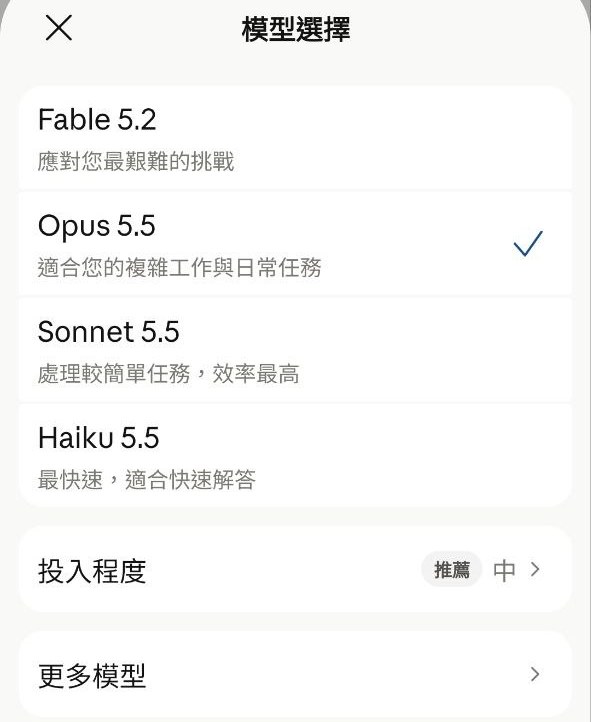
A little after 3 a.m. on November 10, Taipei time, the model picker in the claude.ai mobile app (on a paid plan) listed Fable 5.2 above Opus 5.5, Sonnet 5.5 and Haiku 5.5.
At the same moment, Claude Code on the desktop was version 2.1.285. Tested: claude -p --model fable resolved to claude-fable-5-1, and asking for --model claude-fable-5-2 directly printed this line to stderr:
[claude-code:unrecognized_model] {"model":"claude-fable-5-2","query_source":"sdk"}
The reason is in the Claude Code CHANGELOG: version 2.1.321 added Fable 5.2 and made it the default Fable model. The docs also state that Fable 5.2 requires Claude Code v2.1.321 or later.
The published specs: a 1M token context window, up to 128K output tokens per response, and thinking that is always on, with effort controlling its depth. The price is $8 per million input tokens and $40 per million output tokens, down from $10 and $50 for Fable 5.1. The announcement says it generates output up to 30% faster than 5.1. The same underlying model is also offered as Claude Mythos 5.2, only to organizations verified through Anthropic's verification programs.
The Fable line started with Fable 5 on June 9, 2026, and Fable 5.1 followed on September 1, so this is the third release. Fable 5.1 has not been removed. It is listed among the legacy models that are still available, and you can select it by its full ID.
Check and upgrade in three minutes
1. Check your version. In a terminal:
claude --version
Anything below 2.1.321 needs an upgrade.
2. Upgrade. The official docs say claude update. If you are on the stable release channel, claude update may not reach 2.1.321 yet, so switch Auto-update channel to latest in /config first, then update. If you installed with Homebrew or WinGet, the new version may arrive later. Our install is a global npm install, and this line took us from 2.1.285 to 2.1.321 in 9 seconds (tested):
npm i -g @anthropic-ai/claude-code@latest
3. Confirm the model. In an interactive session, type /model. Without any model setting, Claude Code starts on Opus 5.5; to use Fable you have to run /model fable. In a script, ask for JSON output and read the model name under modelUsage. The line below makes one real Fable call; see the usage note further down.
claude -p --model fable --output-format json "reply with ok"
Tested after the upgrade: modelUsage contained only claude-fable-5-2.
4. Read unrecognized_model correctly. The official docs describe it as a diagnostic line. Claude Code does not recognize the ID, sends the request with it anyway, and neither exits nor switches models. In -p mode it goes to stderr; in an interactive session it goes to the debug log. If your version is below the minimum a model requires, the server answers with a 400 whose error code is claude_code_version_too_old. Either message has the same fix, which is to upgrade.
5. Know how the alias moves. According to the official version history, fable has resolved to Fable 5.1 since 2.1.257 and to Fable 5.2 since 2.1.321. If your settings say "model": "fable", the next new session after the upgrade runs 5.2. To pin a version, write the full ID in your project settings. On Pro and Max plans, a claude-fable-5-1 saved in your user settings is changed to fable the first time you run 2.1.321; project and local settings are left alone.
6. Restart the session. Tested: several claude processes were running during the upgrade. None of them stopped, and each one stayed on the model it started with. Close and reopen to switch. claude --continue resumes your most recent conversation, but the official docs say a resumed conversation usually keeps the model it was saved with, so type /model after restarting and switch to fable if needed.
In practice: one coordinator session and overnight workers
Our usual setup is one long-running interactive Claude Code session that coordinates, plus several claude -p workers on the night shift. We run at most 6 workers at a time, a limit we set after 10 parallel agents froze the machine. The coordinator session has scheduled tasks that collect worker reports at set times.
What we do:
- Count the processes. On Windows PowerShell,
Get-Process claude | Measure-Object; on macOS or Linux,pgrep -c claude. Know how many workers are running and when each one reports back. - Write down the collection points. Scheduled tasks inside the coordinator session belong to that session and are gone if you restart without
--continue. Save the list to a file before restarting. The official docs say--resumeand--continuerestore scheduled tasks that have not expired, so after resuming, check which ones are still there before you add any back. After the restart, type/modelto confirm the model. - Upgrade. Running workers keep going and report as usual; workers started afterwards with the fable alias run on 5.2.
- Restart the coordinator last. Wait until the night-shift reports are in, then restart it.
The whole upgrade was one npm command, and no worker was stopped.
Not every worker needs Fable either. Our workers default to Opus 5.5. Only high-value tickets that touch production go to Fable, and when the Fable allowance runs out they fall back to Opus. The 5.2 price cut loosens that rule a little, but running several Fable workers at once still needs a usage budget.
One thing to know first. The official docs say that in non-interactive -p runs, when Fable usage would bill to usage credits, Claude Code bills it without asking. Before you launch several Fable workers overnight, open /model and check whether the Fable row says "Requires usage credits".
When to wait
A night shift is halfway done. The upgrade does not interrupt running workers, but one batch ends up split between 5.1 and 5.2, which makes the results hard to compare. We upgrade the tool, let new workers pick up the new model, and restart the coordinator only after the reports are in.
Workers on long tasks. The docs warn that on long, multistep tasks Fable 5.2 sometimes ends a turn with a list of what remains or an offer to continue, more often at low and medium effort. The claude.ai app shows "medium" as the recommended effort. The announcement says medium is the default in Claude apps and Claude Code, the Claude Code model configuration docs also list medium as the Fable 5.2 default, and the API default is high. Spell out the completion criteria in your worker prompts.
Code that builds its own API requests. Requests built by Claude Code, claude.ai or the Claude Agent SDK need no changes. If your code builds the messages array itself, the docs list four breaking changes from 5.1, including a check on whether earlier turns were edited. Run the test in the migration guide before you switch.
Company accounts. The automatic switch from step 5, where a claude-fable-5-1 in user settings becomes fable, waits for organization settings on Team and Enterprise plans, so it can happen a few startups later or not at all. Open a new session and check with /model.
To follow these sessions from your phone, see our Claude Code Remote Control guide. To connect external tools, see how to connect MCP servers to Claude Code.
FAQ
Should my Claude Code settings say fable or a version number?
Write fable if you always want the newest Fable model. The official docs say aliases move with Claude Code versions: from 2.1.257 fable resolves to Fable 5.1, and from 2.1.321 to Fable 5.2. To pin a version, write the full ID, such as claude-fable-5-1, in your project settings. On Pro and Max plans, a claude-fable-5-1 saved in your user settings switches to fable the first time you run 2.1.321; values in project or local settings stay as they are.
Will a Claude Code session that is already open switch to Fable 5.2 after the upgrade?
No. Several claude processes were running during our upgrade and none of them stopped, but each one stayed on the model it started with. Close the session and start a new one. The official docs say a conversation you pick back up with claude --continue or claude --resume usually keeps the model it was saved with, so type /model after resuming and switch with /model fable if needed.
How do I choose between Opus, Sonnet and Fable?
Anthropic recommends starting most work on Claude Opus 5.5, then moving up to Fable or down to Sonnet 5.5 or Haiku 5.5 depending on the scope and complexity of the work. The official positioning for Fable 5.2 is demanding reasoning and long-horizon agentic work. Without any model setting, Claude Code starts on Opus 5.5; to use Fable you have to run /model fable. The Claude Code docs describe opus for complex reasoning, sonnet for daily coding and haiku for simple tasks.
Does [claude-code:unrecognized_model] mean something is broken?
It is not a crash. The official docs describe it as a diagnostic line: your Claude Code version does not recognize that model ID, but it still sends the request with the ID you configured, and it does not exit or switch models. In -p mode the line goes to stderr. When you see it, run claude --version, and upgrade if you are below 2.1.321.
Is Fable 5.2 more expensive than 5.1, and can I still use 5.1?
It is cheaper. The official price is $8 per million input tokens and $40 per million output tokens, against $10 and $50 for Fable 5.1. Fable 5.1 is listed among the legacy models that are still available, and you can select it in Claude Code with /model claude-fable-5-1 or claude --model claude-fable-5-1.